Stable wired networks and managed business WiFi for operationally critical connectivity.
Every site is assessed for its operational needs, existing infrastructure and maintainability. We explain the scope clearly before installation, repair, upgrade or ongoing support.
Structured Cat6 cabling
Business WiFi and Omada
PoE network design
Switch and rack installation
Coverage and performance troubleshooting
CCTV network segregation
Business network support
Wi-Fi keeps dropping—or coverage never reaches the rooms that need it.
A network problem can start at the access point, cabling, PoE switch, gateway, firewall, internet service or configuration. We review the complete path instead of assuming the internet package is the only cause.
MIB Smartech supports business Wi-Fi and network infrastructure used by staff devices, CCTV, access control, smartboards, IP phones and operational systems across Selangor and Kuala Lumpur.
One structured platform from the internet gateway to every access point.
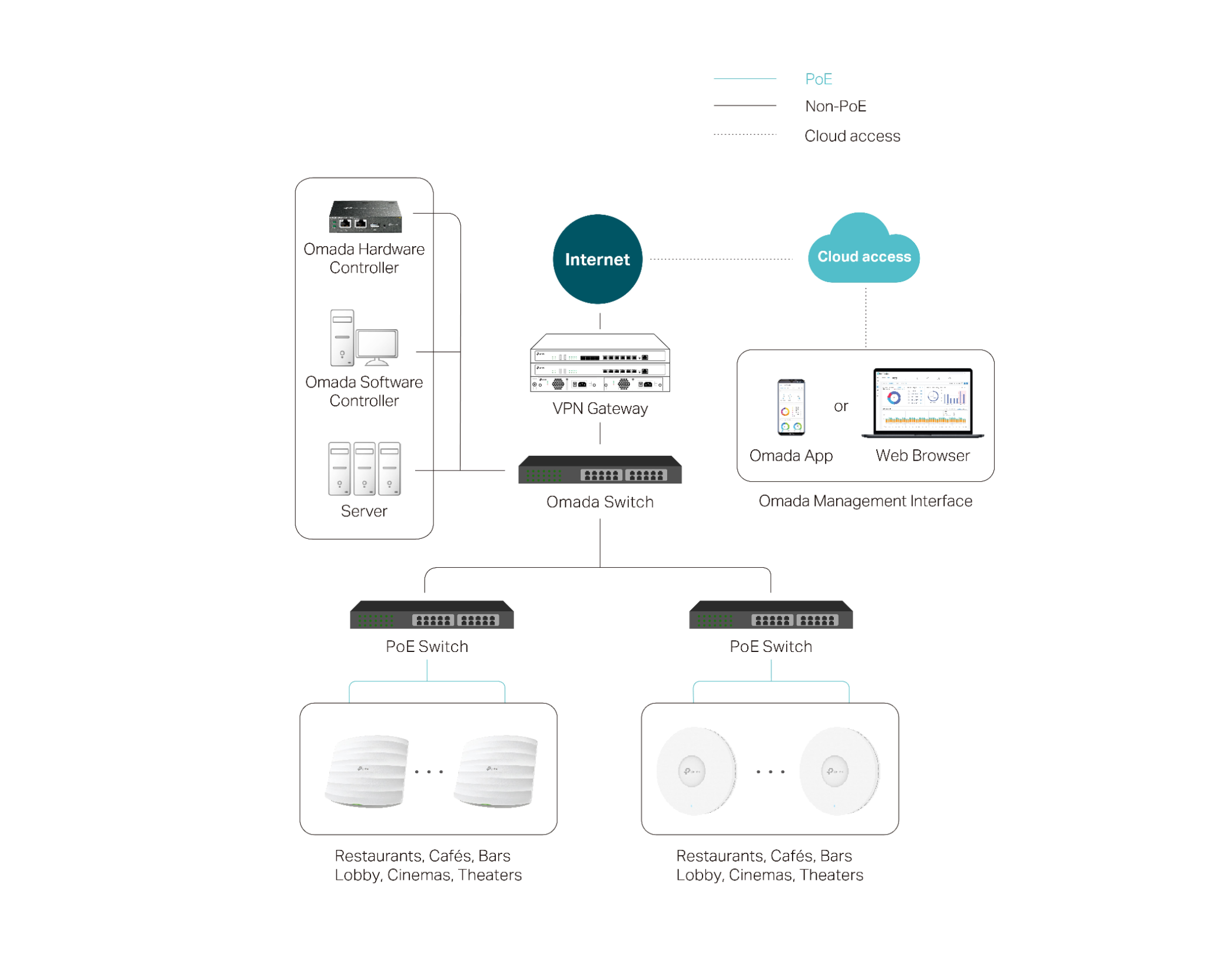
A managed network allows compatible gateways, switches and access points to be configured and monitored from a central controller. This provides clearer visibility than managing every device separately.
Central monitoring: review device status, connected clients and selected network events.
Consistent configuration: apply wireless names, security settings and network policies across supported devices.
PoE deployment: power compatible access points through the network cable to simplify installation.
Scalable coverage: add access points or switches as users, rooms and operational systems grow.
Actual functions depend on the selected equipment, licences, topology and internet service.
Common network issues
The symptom may appear on Wi-Fi, but the cause can be elsewhere.
Reliable troubleshooting checks the complete path—from the user device and access point to cabling, PoE, switches, gateway, firewall and internet service.
01
Slow Wi-Fi
Users experience low speed even when the internet package appears sufficient.
Possible causes
Weak signal or poor access-point placement
Channel congestion and interference
Too many active devices on one access point
A bottleneck in the internet link, uplink or switch
02
Frequent Disconnections
Devices repeatedly lose connectivity or reconnect during work.
Possible causes
Unstable coverage between access points
Outdated firmware or incorrect configuration
Faulty cabling, connectors or PoE supply
Interference from neighbouring wireless networks
03
Wi-Fi Dead Zones
Selected rooms, corners or floors receive little or no usable signal.
Possible causes
Insufficient access-point coverage
Concrete walls, metal racks or equipment blocking signal
Access points installed too far from users
A layout change made after the original installation
04
Connected, but No Internet
A device joins the Wi-Fi network but cannot reach online services.
Possible causes
ISP outage or modem fault
Router, gateway or DNS problem
Incorrect VLAN, DHCP or firewall policy
Uplink cable or switch-port failure
05
Network Becomes Slow at Peak Hours
Performance drops when staff, guests or operational devices are active together.
Possible causes
Insufficient wireless capacity
Limited internet bandwidth
Poor traffic prioritisation
Large downloads, cloud backups or video traffic competing with critical applications
06
Devices Cannot Roam Smoothly
Calls or applications pause when users move between coverage areas.
Possible causes
Access points operating as isolated networks
Inconsistent SSID or security settings
Coverage cells that are too weak or overlap poorly
Roaming features not planned for the client devices
07
PoE Device Offline
An access point, CCTV camera or IP phone suddenly loses power or network access.
Possible causes
PoE power budget exceeded
Damaged cable or connector
Unsupported PoE standard
Faulty switch port or connected device
08
Unstable Network After Expansion
New devices work inconsistently after the site adds users, cameras or access points.
Possible causes
IP-address conflicts or insufficient DHCP capacity
Unplanned switch uplinks and bandwidth
Incorrect VLAN configuration
Existing equipment no longer sized for the expanded network
Infrastructure components
The equipment behind a manageable business network.
Not every site needs every device. The correct combination depends on the floor plan, user count, traffic profile, building materials and future expansion.
01
Access Point
Provides wireless connectivity to nearby phones, laptops, smartboards and other Wi-Fi devices.
02
Wi-Fi 6 Access Point
Supports newer Wi-Fi 6 devices with improved efficiency and capacity in busy environments.
03
Network Switch
Connects wired devices on the local network. A PoE switch can also deliver data and power to compatible access points, cameras and phones.
04
Router
Directs traffic between the local network, internet connection and other configured networks.
05
Gateway
Acts as the controlled entry and exit point for network traffic, with selected models also supporting VPN, routing and security policies.
06
Controller
Provides central configuration, monitoring and management for supported access points, switches and gateways.
07
Firewall
Applies security rules to permitted and blocked network traffic to reduce exposure to unauthorised access.
Better network planning
Build for coverage, capacity, security and maintainability.
A professional network design considers more than maximum speed. It should support the actual number of users and connected systems while remaining practical to troubleshoot and expand.
Site survey
Review floor layout, signal obstacles, cable routes and high-demand areas before fixing access-point positions.
Structured cabling
Use labelled and tested cabling so faults can be isolated without unnecessary guesswork.
Network separation
Separate staff, guest and operational devices where appropriate using supported VLAN and policy controls.
Monitoring & documentation
Keep device records, configurations and topology information available for future support and expansion.